In many applications, there are more than one containers running. There are different communications involved
- Containers communicating with host machine
- Containers communicating with each other
- containers communicating with internet
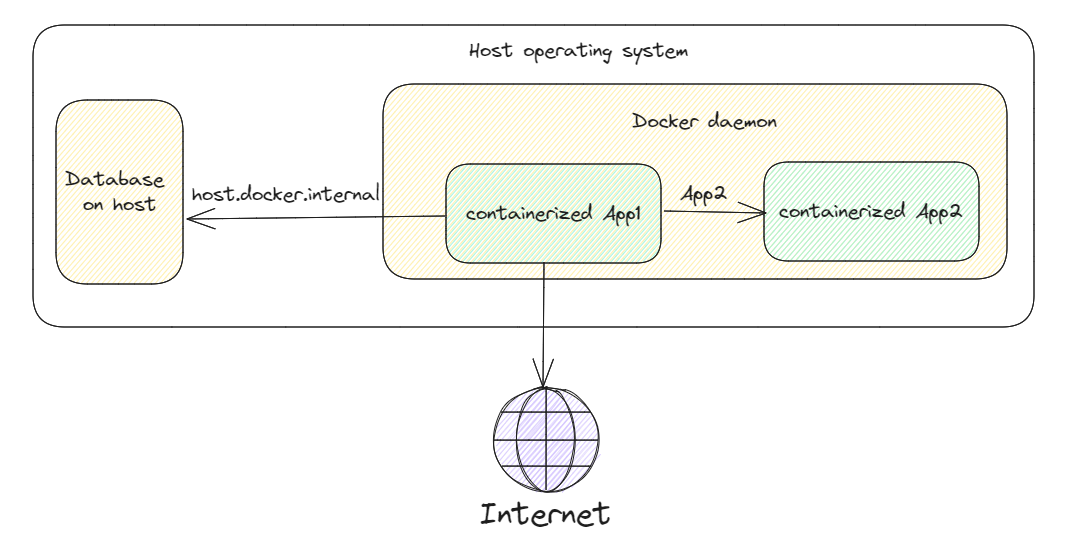
Communication with host machine
By default, Docker containers cannot access the host machine’s network since they are segregated from it. Using the hostname “host.docker.internal” is one method of allowing containers to access the network of the host system. A unique address called host.docker.internal is converted by Docker to the IP address of the server running the container.
The “localhost” inside of the Container refers to the Container environment, not to the local host machine which is running the Container.
Example:
docker run --rm -it alpine sh
# inside container
ping host.docker.internal
If your app runs on host at port 5000, your container should call:
http://host.docker.internal:5000
not http://localhost:5000.
Communication with other containers
When two containers are connected to the same network, they can speak to one another using their container names.
sample:
docker run -network my-network --name app1 image1
docker run -network my-network --name app2 image2
Both app1 and app2 would be on the same network i.e “my-network”. They can communicate with each using their names i.e app1 and app2.
In practice, container-to-container communication usually uses:
http://<container-name>:<container-port>
For example, if app2 exposes port 8080 inside the container, app1 can call:
http://app2:8080
Important: published port vs container port
When you publish a port (-p 9000:8080):
9000is host port8080is container port
Other containers on the same Docker network should use the container port (8080), not host port (9000).
Docker Compose communication
In Docker Compose, service names act like DNS names automatically.
services:
	api:
		image: my-api
		ports:
			- "8080:8080"
	web:
		image: my-web
		environment:
			- API_BASE_URL=http://api:8080
Here web can call api using http://api:8080.
Isolating communication with custom networks
Use separate networks to reduce accidental connectivity.
services:
	frontend:
		image: my-frontend
		networks: [front]

	backend:
		image: my-backend
		networks: [front, back]

	database:
		image: postgres:16
		networks: [back]

networks:
	front:
	back:
frontend cannot directly reach database, but can reach backend.
Communication with internet
This will work out of the box, no extra configuration is required.
Most containers can call external APIs directly:
docker run --rm curlimages/curl:8.8.0 https://api.github.com
If outbound connectivity fails in corporate environments, check:
- Proxy settings (
HTTP_PROXY,HTTPS_PROXY,NO_PROXY) - Firewall rules
- DNS resolution
Practical troubleshooting commands
When communication fails, these commands are very useful:
# list networks
docker network ls

# inspect a specific network
docker network inspect my-network

# inspect container IP and network attachments
docker inspect app1

# test DNS from one container to another
docker exec -it app1 ping app2

# test HTTP connectivity
docker exec -it app1 sh -c "wget -qO- http://app2:8080/health"
Common mistakes
- Using
localhostfor another container - Using host published port for container-to-container calls
- Forgetting both containers must be on same network
- Starting dependent service too early (before target service is healthy)
Practical best practices
- Use service/container names, not hard-coded IPs
- Add health endpoints (
/health) and probe them - Keep databases on internal/private networks only
- Publish only required ports to host
- Use environment variables for URLs and ports
References