Have you ever wondered what happens behind the scenes when you visit an HTTPS website? How does your browser establish a secure connection with the server? This is where the TLS handshake comes in—a quick “conversation” between your browser and the server to set up encrypted communication.
The Restaurant Analogy
Think of a TLS handshake like entering a secure restaurant:
- You arrive and tell the host your preferences (“Client Hello”)
- Host verifies the restaurant by showing you their business license (“Certificate”)
- You and the host agree on a secret code to communicate with the waiter (“Key Exchange”)
- All conversations with the waiter now use this secret code (“Encrypted Communication”)
That’s essentially what happens when your browser connects to https://example.com!
What is a TLS Handshake?
TLS (Transport Layer Security) is the technology that puts the “S” in HTTPS—it encrypts data between your browser and websites.
A TLS handshake is a quick negotiation (usually taking 100-300 milliseconds) where:
-
🤝 Client and server introduce themselves
“Hi, I’m Chrome, I support these encryption methods” -
📜 Server proves its identity
“Here’s my certificate signed by a trusted authority” -
🔑 Both agree on encryption keys
“Let’s use this secret key for our conversation” -
🔒 Everything switches to encrypted mode
All data is now scrambled—only you and the server can read it
When does this happen?
- Every time you visit an HTTPS website
- When apps make API calls (e.g., weather app checking forecast)
- Email programs connecting to mail servers
- Banking apps connecting to your bank
- Any secure internet communication
TLS 1.2: The Older Standard (Still Widely Used)
TLS 1.2 has been the internet’s security standard since 2008. While newer (TLS 1.3) is faster, many websites still use TLS 1.2.
The key thing to know: TLS 1.2 requires 2 round trips between client and server, taking about 200ms on average.
The Conversation Flow (Simplified)
Imagine calling a business:
Round Trip 1:
You: "Hello, I'd like to talk securely. I speak English and Spanish."
Business: "Great! I speak English too. Here's my ID to prove who I am."

Round Trip 2:
You: "ID verified! Here's a secret password (encrypted)."
Business: "Got it! Let's start our secure conversation."

Now you can talk privately!
That’s TLS 1.2 in a nutshell!
TLS 1.2 Visual Diagram
Here’s what the TLS 1.2 handshake looks like:
What takes the time:
- Round Trip 1: Client introduces itself → Server responds with certificate
- Round Trip 2: Client sends encrypted key → Both switch to encrypted mode
- Total: ~200ms (2x slower than TLS 1.3)
• TLS version: 1.2
• Cipher suites
• Random number
• Domain name Server->>Client: ② Server Hello
• Selected TLS 1.2
• Selected cipher
• Random number Server->>Client: ③ Certificate
• Server's digital certificate
• Public key
• Signed by CA Server->>Client: ④ Server Hello Done
• Finished sending info Note over Client,Server: 📍 Round Trip 2 (~100ms) Note over Client: Client verifies certificate
Generates pre-master secret Client->>Server: ⑤ Client Key Exchange
• Pre-master secret
• Encrypted with server's public key Note over Client: Derives session keys from:
• Client random
• Server random
• Pre-master secret Client->>Server: ⑥ Change Cipher Spec
• Switching to encrypted mode Client->>Server: ⑦ Finished
🔒 First encrypted message Note over Server: Decrypts pre-master secret
Derives same session keys Server->>Client: ⑧ Change Cipher Spec
• Switching to encrypted mode Server->>Client: ⑨ Finished
🔒 Confirms encryption works Note over Client,Server: 🔒 Secure Connection Established
Total Time: ~200ms Client->>Server: 🔒 Encrypted Application Data Server->>Client: 🔒 Encrypted Application Data
TLS 1.2 Step-by-Step
Let me break down what actually happens:
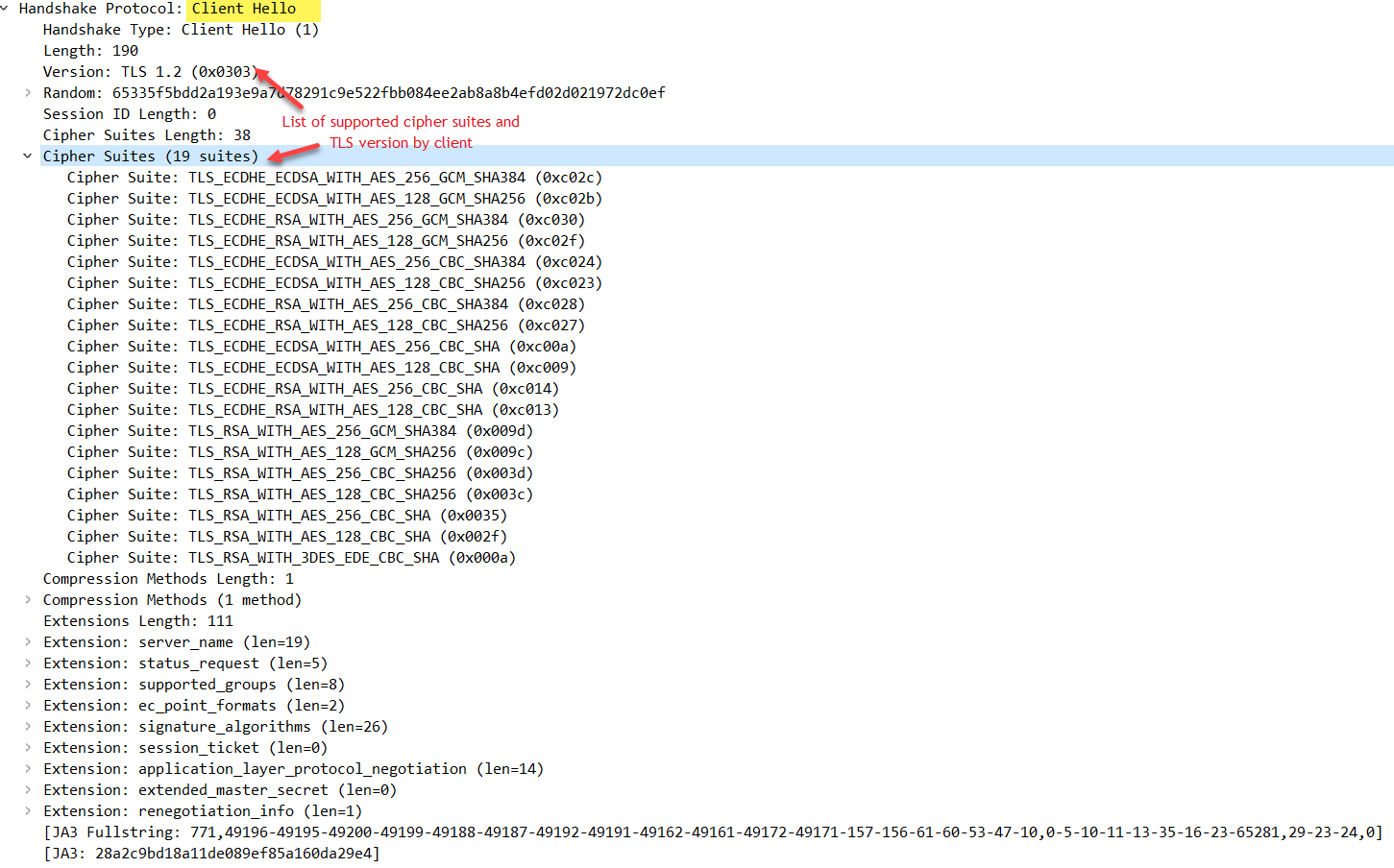
Step 1: Client Hello 👋
What happens: Your browser says “Hi, I want to connect securely!”
What it sends:
- “I can speak TLS 1.2, TLS 1.1, or TLS 1.0”
- “I support these encryption methods: AES-256, AES-128, ChaCha20…”
- A random number (used later for encryption keys)
- The website name (example.com)
Real-world example:
Browser → Server:
"Hi google.com! I'm Chrome. I support TLS 1.2.
I can use AES-256 or AES-128 encryption.
Here's a random number: 8a3f9c2b..."
In Plain English:
Your browser introduces itself and lists what security features it supports—like saying “I speak English, Spanish, and French” before a conversation.
Step 2: Server Hello 👋 + Certificate 📜
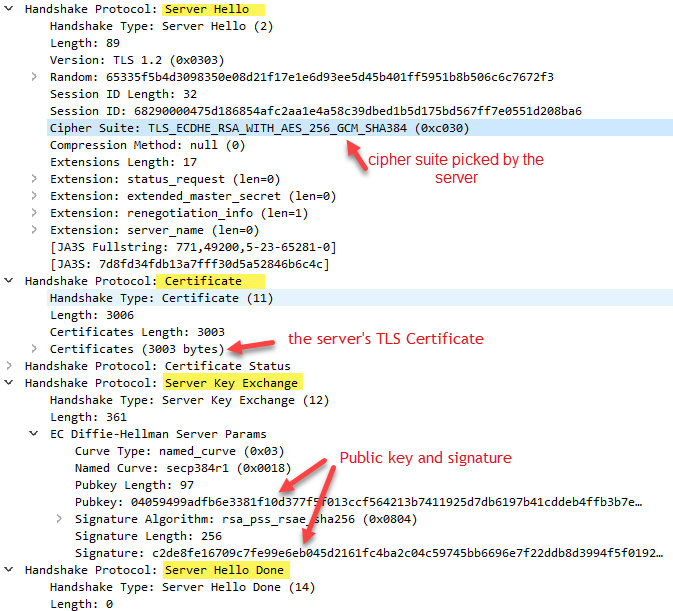
What happens: The server responds with its choice and proves its identity.
Server sends multiple things:
2a. Server Hello:
- “I’ll use TLS 1.2”
- “Let’s use AES-256-GCM encryption”
- Another random number
2b. Certificate (Digital ID):
- The website’s certificate (like a passport)
- Proves this is really google.com, not a fake
- Contains the server’s public key (explained below)
Real-world example:
Server → Browser:
"Hi Chrome! I agree to use TLS 1.2 with AES-256.
Here's my certificate signed by Let's Encrypt.
It proves I'm really google.com.
Here's a random number: 7f2e4d1a..."
In Plain English:
The server says “I’ll speak English with you” and shows its ID to prove it’s legitimate—like a business showing you its license before you share personal information.
Understanding Certificates:
A certificate is like a passport:
- Issued by a trusted authority (Certificate Authority like Let’s Encrypt)
- Has an expiration date (usually 90 days or 1 year)
- Contains the server’s identity (domain name)
- Can’t be faked (cryptographically signed)
Step 3: Client Generates Secret Key 🔑
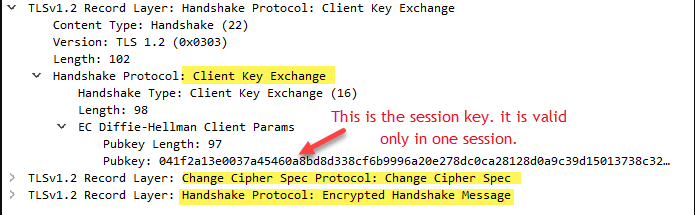
What happens: Your browser creates a secret password and sends it securely.
The process:
- Browser generates a random “pre-master secret” (like a password)
- Encrypts it using the server’s public key (from the certificate)
- Sends encrypted secret to server
- Only the server can decrypt it (using its private key)
Real-world example:
Browser:
1. Generates secret: "MySecretKey123"
2. Encrypts with server's public key: "9x4j2k8m..."
3. Sends encrypted version to server

Server:
1. Receives encrypted data: "9x4j2k8m..."
2. Decrypts with its private key
3. Now has the same secret: "MySecretKey123"
In Plain English:
Imagine you write a secret code on paper, put it in a box that only the server has the key to open, and mail it. Even if someone intercepts the box, they can’t open it. Only the server can.
Key Pair Explained (Public Key + Private Key):
- Public key: Like a padlock anyone can use to lock a box
- Private key: The only key that opens that padlock
- Server has both: Public key (shared with everyone), Private key (kept secret)
- Your browser uses the public key to encrypt data
- Only the server’s private key can decrypt it
Step 4: Both Sides Calculate Session Keys 🔐
What happens: Both browser and server use the secrets to generate encryption keys.
The math:
Browser has:
- Client random number
- Server random number
- Pre-master secret

Server has:
- Client random number
- Server random number
- Pre-master secret (decrypted)

Both calculate:
Pre-master secret + Client random + Server random
= Master Secret
= Session Keys
Important: Both sides get the exact same session keys without ever sending them over the network!
In Plain English:
Both sides use the same recipe to bake a cake. They each add the same ingredients (random numbers + secret), and they both get the same cake (session keys)—without ever showing the final cake to anyone watching.
Step 5: Start Encrypted Communication 🔒
What happens: Both sides say “Ready!” and switch to encrypted mode.
Messages exchanged:
- Browser: “Change Cipher Spec” → “I’m switching to encrypted mode now”
- Browser: “Finished” (encrypted) → First encrypted message proving it works
- Server: “Change Cipher Spec” → “I’m switching to encrypted mode too”
- Server: “Finished” (encrypted) → Confirmation
In Plain English:
Both sides say “Okay, from this point forward, everything we say is in code!” The first encrypted message is like a test to make sure both sides are using the code correctly.
Complete TLS 1.2 Example
Let’s see a real-world example visiting https://amazon.com:
🌐 You type: https://amazon.com in browser

Message 1 (Client → Server):
"Hi amazon.com! I'm Firefox.
I support TLS 1.2 with AES-256-GCM encryption.
Random number: a3b5c7d9..."

Message 2 (Server → Client):
"Hi Firefox! Let's use TLS 1.2 with AES-256-GCM.
Here's my certificate from DigiCert proving I'm amazon.com.
Random number: 8f2e1a4c..."

Message 3 (Client → Server):
"Certificate verified! Here's the secret key (encrypted): 7k9m2p4x..."
"Switching to encrypted mode now!"
"[Encrypted] Test message to confirm encryption works"

Message 4 (Server → Client):
"Got your secret! Switching to encrypted mode!"
"[Encrypted] Confirmed, we're secure!"

🔒 All future messages encrypted!
"GET /shopping-cart HTTP/1.1"  → encrypted
"POST /buy-item" → encrypted
Time taken: ~200 milliseconds
What Gets Encrypted?
After the handshake completes:
✅ Encrypted:
- URLs you visit
- Form data (passwords, credit cards)
- Cookies
- Everything you type
- All HTTP headers and body
❌ Not Encrypted:
- Domain name (amazon.com is visible)
- IP addresses
- Amount of data transferred
- Timing of requests
Why domain is visible:
Your browser needs to know which server to connect to—like how your envelope shows the recipient’s address even if the letter inside is sealed.
Why TLS 1.2 Has Issues
TLS 1.2 has been great, but it has some problems:
- Slow: 2 round trips = 200ms+ delay (noticeable on mobile/satellite connections)
- Complex: Too many options make configuration difficult and error-prone
- Supports weak encryption: Old algorithms like RC4 and 3DES are still allowed
- Not always forward secret: Some modes don’t protect past communications if keys leak
TLS 1.3: The New, Faster, More Secure Standard
TLS 1.3 (released in 2018) is a major upgrade.
The Big Improvements
🚀 Speed: 1 Round Trip Instead of 2
TLS 1.2 (Old):                TLS 1.3 (New):
Browser → Server (1st trip)   Browser → Server (only trip)
Server → Browser (2nd trip)   Server → Browser (same trip)

Total: 200ms                   Total: 100ms (50% faster!)
🛡️ Security: Removed All Weak Encryption
- Deleted 32 weak algorithms
- Only 5 strong algorithms remain
- Forward secrecy is mandatory (protects past data)
🔒 Privacy: More Encrypted
- In TLS 1.2: Certificate sent in plain text
- In TLS 1.3: Certificate encrypted (more private)
How TLS 1.3 Works (Simplified)
The magic trick: Client sends its key share immediately in the first message!
Old Way (TLS 1.2):
Client: "Hello! What encryption do you support?"
Server: "I support AES-256. Now send me your key."
Client: "Here's my key!"
Server: "Got it! Let's talk!"
(2 round trips = slow)

New Way (TLS 1.3):
Client: "Hello! I support AES-256. Here's my key just in case!"
Server: "Perfect! I also picked AES-256. Here's MY key! Let's talk!"
(1 round trip = fast!)
In Plain English:
Instead of asking “Do you speak Spanish?” and waiting for an answer, you just start speaking Spanish. If they understand, great! If not, you switch languages. Saves a whole conversation.
TLS 1.3 Visual Diagram
Here’s what the TLS 1.3 handshake looks like:
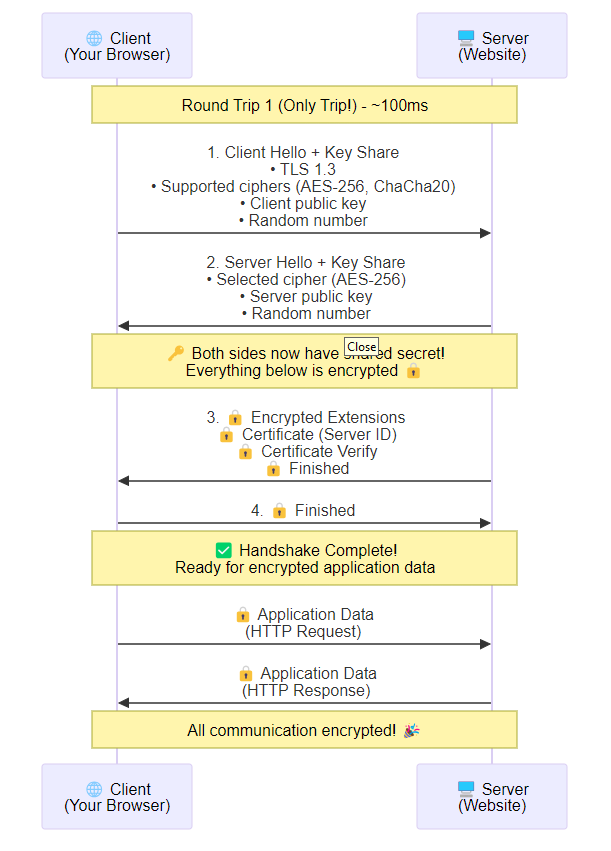
Key differences from TLS 1.2:
- ✅ 1 round trip instead of 2 (50% faster!)
- ✅ Key share sent immediately (no waiting for server to ask)
- ✅ Certificate encrypted (more privacy)
- ✅ Can send data immediately after handshake
TLS 1.3 Step-by-Step
Step 1: Client Hello + Key Share 👋🔑
What’s different: Client sends its encryption key upfront (speculative!).
Browser sends:
"Hi server! I want to use TLS 1.3 with AES-256.
Here are my public keys for 3 different encryption methods:
- Key for method 1: 3a7f9c...
- Key for method 2: 8b2e1d...
- Key for method 3: 5k9m4p...

Pick one and we can start immediately!"
Why multiple keys?
Like bringing 3 different types of chargers (USB-C, Lightning, Micro-USB) so you definitely have the right one!
Step 2: Server Hello + Everything Encrypted 🔒
What’s different: Server sends everything at once, and most of it is encrypted!
Server sends (in order):
Public (not encrypted):
- “I choose TLS 1.3 with AES-256”
- “I’ll use your key #2”
- “Here’s my key for method 2: 7q3w8e…”
Now encrypted (using the keys just exchanged): 4. 🔒 “Here’s my certificate proving I’m amazon.com” 5. 🔒 “Here’s my signature” 6. 🔒 “Handshake done!”
In Plain English:
The server picks which “charger” to use, plugs it in immediately, and all further conversation is encrypted—including showing its ID!
Why encrypt the certificate?
Privacy! In TLS 1.2, anyone snooping can see which website you’re visiting. In TLS 1.3, it’s encrypted (more private).
Step 3: Client Confirms 🔒
Client sends (encrypted):
🔒 "I verified your certificate!"
🔒 "Handshake complete on my end!"
🔒 "Here's my first request: GET /home HTTP/1.1"
Done! Application data flows immediately after just 1 round trip!
TLS 1.3 Complete Example
🌐 You type: https://facebook.com

Message 1 (Client → Server):
"Hi facebook.com! I'm Chrome using TLS 1.3.
I support AES-256 and ChaCha20.
Here's my public key for AES-256: 9a4f7c..."

Message 2 (Server → Client):
"Hi Chrome! Let's use TLS 1.3 with AES-256.
Here's my public key: 3k8m2p..."

🔒 [ENCRYPTED] "Here's my certificate from DigiCert"
🔒 [ENCRYPTED] "Signature to prove I own the certificate"
🔒 [ENCRYPTED] "Handshake done!"

Message 3 (Client → Server):
🔒 [ENCRYPTED] "Certificate verified!"
🔒 [ENCRYPTED] "GET /news-feed HTTP/1.1"

🔒 All communication encrypted!
Time taken: ~100 milliseconds (50% faster than TLS 1.2!)
TLS 1.3 0-RTT: Instant Reconnection
For returning visitors, TLS 1.3 has an even faster mode: 0-RTT (zero round trip time).
How it works:
First visit:
- Regular 1-RTT handshake
- Server gives you a “ticket” (like a VIP pass)
Second visit:
Client → Server:
"Hi! Remember me? Here's my ticket.
Here's my request already: GET /profile"
(sent immediately, no waiting!)

Server → Client:
"Welcome back! Here's your data..."
In Plain English:
Like having a Fast Pass at an amusement park—you don’t wait in line, you just walk right in!
Time: 0ms handshake delay (instant!)
Trade-off: Less secure for the first request (can be replayed), so only use for safe operations like GET requests, not login/payment forms.
Quick Comparison: TLS 1.2 vs TLS 1.3
| What | TLS 1.2 | TLS 1.3 |
|---|---|---|
| Speed (first time) | 200ms | 100ms (2x faster!) |
| Speed (returning) | 200ms | 0ms with 0-RTT! |
| Messages | 4 messages | 3 messages |
| Round trips | 2 | 1 |
| Certificate | Visible to snooper | Encrypted (private) |
| Weak encryption | Still allowed (RC4, 3DES) | Removed (secure!) |
| Configuration | 37+ options (confusing) | 5 options (simple) |
| Forward secrecy | Optional | Always on |
Bottom line: TLS 1.3 is faster, simpler, and more secure!
Real-World Performance Impact
Loading a website:
TLS 1.2:
TCP connection: 100ms
TLS handshake: 200ms
HTTP request: 50ms
Total: 350ms

TLS 1.3:
TCP connection: 100ms
TLS handshake: 100ms (faster!)
HTTP request: 50ms
Total: 250ms

Difference: 100ms saved (29% faster page load!)
On mobile/slow connections, this is huge:
- TLS 1.2: 500-800ms
- TLS 1.3: 250-400ms
- Difference: 300-400ms saved (noticeable improvement!)
🔍 Advanced: Analyzing TLS with Wireshark
For Technical Users: This section shows how to inspect TLS connections using Wireshark (network analysis tool).
What is Wireshark?
Wireshark is like a “phone tap” for your internet connection—it lets you see all network traffic going in and out of your computer. Perfect for learning how TLS works under the hood!
Download: wireshark.org
References and Further Reading
Official Specifications:
- RFC 8446 - TLS 1.3 (Official standard)
- RFC 5246 - TLS 1.2 (Official standard)
Interactive Guides:
- The Illustrated TLS 1.3 ⭐ Best visual explanation!
- The Illustrated TLS 1.2 ⭐ See every byte explained
Testing Tools:
- SSL Labs Server Test (Online grading)
- testssl.sh (Command-line scanner)
- SSLyze (Fast parallel tester)
Learning Resources:
Practice:
- BadSSL.com (Test your browser with bad certificates)
- How’s My SSL? (Check your browser’s TLS)