Understanding AWS SAM: A Serverless Infrastructure

A serverless lambda function has to be designed, developed, built, debugged, and tested locally for my project. AWS Serverless Application Model (AWS SAM) is something that I came upon.

AWS SAM consists of two primary parts:

  1. AWS SAM template specification – An open-source framework that we can use to define our serverless application infrastructure on AWS.
  2. AWS SAM command line interface (AWS SAM CLI) – A command line tool that we can use with AWS SAM templates to build and run the serverless applications.

The SAM CLI offers a number of methods for locally creating, building, executing, and debugging lambda functions. Let’s explore with a Python sample project.

[Read More]
Categories: AWS  Tags: AWS 

Passing environment variables to docker compose & containers

The .env file serves as a mechanism to set environment variables. Sometimes, it’s necessary to ensure these values can be accessed within the containers. At other times, it’s crucial to restrict these variables to the Docker Compose file only.

Upon examining an issue with our product, I discovered that the approach to provide variables to a Compose file differs from the strategies used to pass environment variables to containers. Let’s explore the possible solutions.

[Read More]
Categories: docker  Tags: docker 

Understanding Linux: A Closer Look at File Permissions

There are three categories: User (the file’s owner), Group (the security group you’re in), and Other (for others). Each category allows to establish three permissions: r, w, and x to read, write, and execute a file, respectively. Permissions are denoted by three numbers: 4 for Read, 2 for Write, and 1 for Execute. As a quick reference, here is a table:

User Group Other
Read = 4 x x x
Write = 2 x
Execute = 1 x x x
Totals (4+2+1) = 7 (4 + 1) = 5 (4 + 1) = 5

The single-digit numbers are as follows for all three user categories:

[Read More]
Categories: linux  Tags: linux 

Docker: A Closer Look at Volumes and Bind Mount

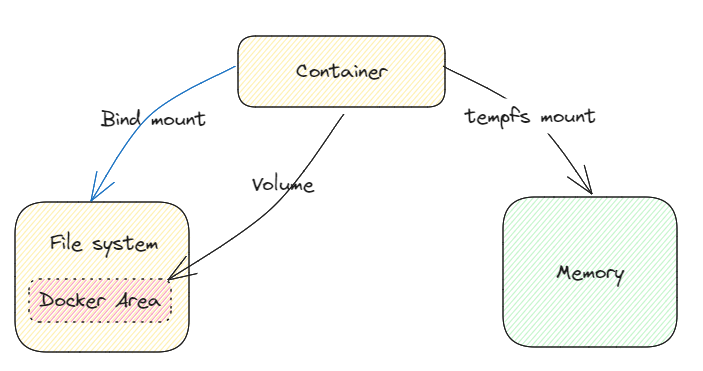
Docker images are read-only. However, containers put a thin “read-write layer” on top of the image. That is, they can change the files and folders in the image without actually changing the image. If the container is stopped and removed, all data written in it is lost. There are different options to manage the data.

docker-volumes-binds

Volumes

Volumes are folders (and files) on your host machine that are linked to folders / files within a container. Docker creates and manages volumes.

[Read More]
Categories: docker  Tags: docker 

Docker Communication: Breaking Down Container Interactions

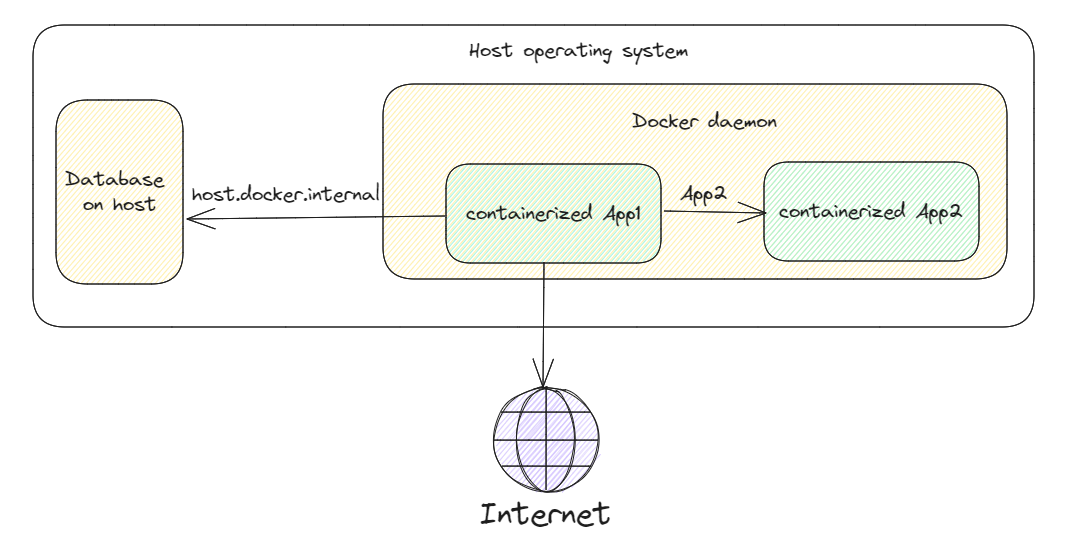
In many applications, there are more than one containers running. There are different communications involved

  1. Containers communicating with host machine
  2. Containers communicating with each other
  3. containers communicating with internet

docker-communication

Communication with host machine

By default, Docker containers cannot access the host machine’s network since they are segregated from it. Using the hostname “host.docker.internal” is one method of allowing containers to access the network of the host system. A unique address called host.docker.internal is converted by Docker to the IP address of the server running the container.

[Read More]
Categories: docker  Tags: docker